
Improve Magento store speed: Disable unused Pearl Theme extensions and Design Elements, implement Advanced JS Bundling
Disable unused extensions and Design Elements that come with Pearl Theme to improve speed and strip down the theme code to only load the functionality you need for your project.
Associated Pearl Theme extensions highly increase the theme functionality and are located under the folder structure below.
You can choose the extensions you need, and deactivate the ones you don't need – this way your code will be light, fast, and more conflict-free.
app/code/WeltPixel/NavigationLinks(MegaMenu)app/code/WeltPixel/Quickviewapp/code/WeltPixel/GoogleCardsapp/code/WeltPixel/TitleRewriteapp/code/WeltPixel/SmartProductTabsapp/code/WeltPixel/MobileDetectapp/code/WeltPixel/InstagramWidgetapp/code/WeltPixel/FullPageScrollapp/code/WeltPixel/GoogleTagManagerapp/code/WeltPixel/Sitemapapp/code/WeltPixel/QuickCartapp/code/WeltPixel/ReviewsWidgetapp/code/WeltPixel/Multistoreapp/code/WeltPixel/ThankYouPageapp/code/WeltPixel/AjaxInfiniteScrollapp/code/WeltPixel/SearchAutoCompleteapp/code/WeltPixel/LayeredNavigationapp/code/WeltPixel/Newsletterapp/code/WeltPixel/AdvanceCategorySortingapp/code/WeltPixel/ProductLabelsapp/code/WeltPixel/SocialLoginapp/code/WeltPixel/AdvancedWishlistapp/code/WeltPixel/SpeedOptimizationapp/code/WeltPixel/EnhancedEmail(Pearl Theme Professional Pack only)app/code/WeltPixel/CmsBlockScheduler(Pearl Theme Professional Pack only)app/code/WeltPixel/RecentlyViewedBar(Pearl Theme Professional Pack only)app/code/WeltPixel/UserProfile(Pearl Theme Professional Pack only)
Advantages of modularity:
- Faster and lighter code.
- Easier debugging – disable sections individually to identify issues.
- Flexibility to replace parts with 3rd-party modules (e.g., disable WeltPixel MegaMenu and use a 3rd-party MegaMenu extension).
Disable an extension via SSH
Run these commands in your Magento root:
- General syntax:
php bin/magento module:disable WeltPixel_[ExtensionName] --clear-static-content
php bin/magento setup:upgrade
- Example: disabling Quickview:
php bin/magento module:disable WeltPixel_Quickview --clear-static-content
php bin/magento setup:upgrade
For even more speed: Modular Design Elements
- Disable any Design Elements you don’t use from Magento Admin options – the corresponding code or library will not be loaded.
- Not only are the theme and extensions modular, but all the included Design Elements are too.
Examples: Bootstrap Grid, Icons, Tables, Toggle, Accordion, Tabs, Pricing Boxes, Headings and Blockquotes, Dividers, Brand lists, Smooth Scrolling, Icon Boxes, Alert Boxes, Testimonials, Flex Slider, Buttons, Sections/Parallax, Back-to-top button, etc.
Disable design elements from:
Admin → Store → Configuration → WeltPixel → Design Elements
⚠️ Note: If you notice broken functionality after disabling, re-enable the element you disabled.
- Example 1: If you disable Animations, the animations library and CSS will no longer load.
- Example 2: If you disable Icons, icons won’t display until re-enabled.


Use the Speed Optimization extension
Implement Magento Advanced JS Bundling and preload CSS files:
Magento 2 Speed Optimization & Advanced JS Bundling
Case Study
On a recent project with Pearl Theme + Speed Optimization module + Advanced JS Bundling, Google PageSpeed scores improved dramatically:
- Mobile: +55 points (from 25 → 80)
- Desktop: +16 points (from 75 → 91)
This was achieved by disabling unused modules, design elements, and enabling advanced bundling.
Final scores:
- Mobile:

- Desktop:

WebPageTest result:

GTmetrix result:

How was this achieved?
- Disabled unused modules:
php bin/magento module:disable Amazon_Core
php bin/magento module:disable Amazon_Login
php bin/magento module:disable Amazon_Payment
php bin/magento module:disable WeltPixel_Quickview
php bin/magento module:disable WeltPixel_RecentlyViewedBar
php bin/magento setup:upgrade
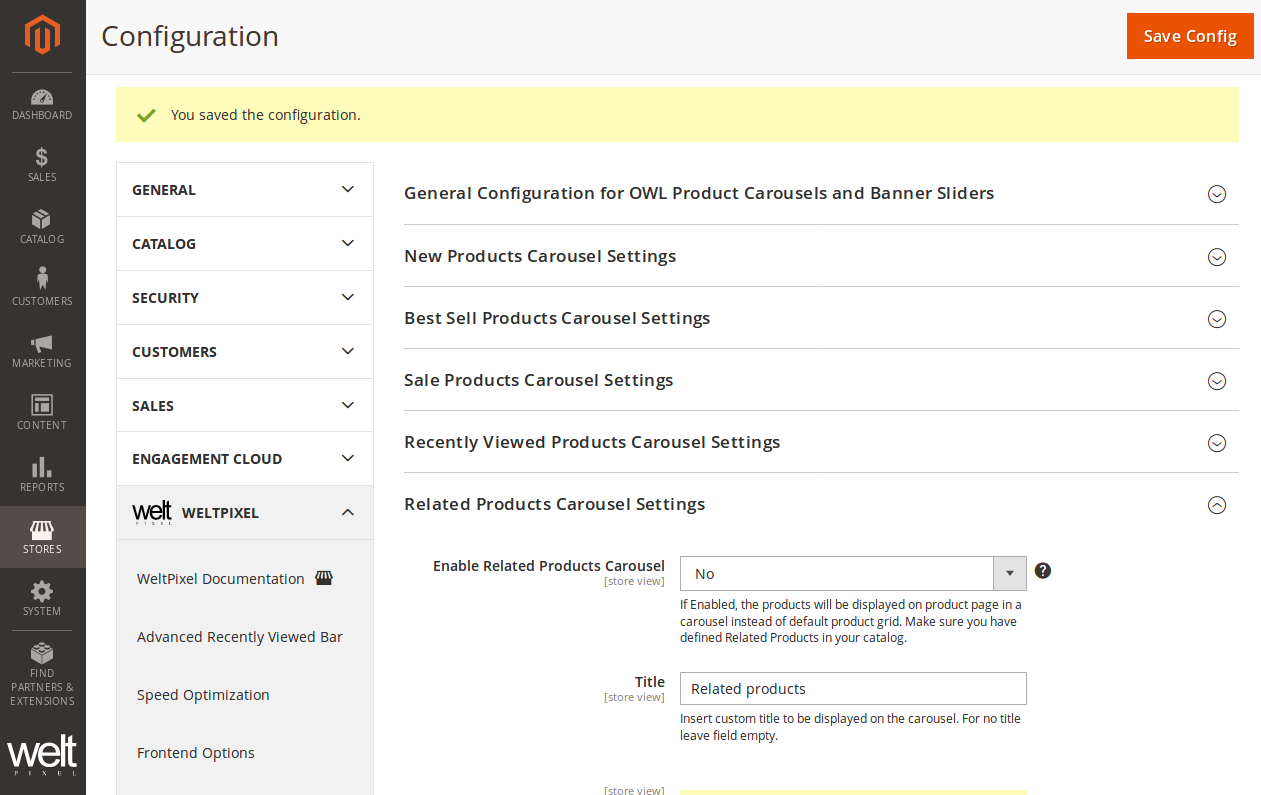
- Optimized Related Products:
- Store had only 4 related products, so no need for carousel.
- Disabled OWL Carousel for related products → Lazy Load module kicked in → images loaded only when needed → faster pages.
- Disabled unused Design Elements (extra JS/CSS libraries):
- Tables, Pricing Boxes, Headings & Blockquotes, Dividers, Brand Lists, Alert Boxes, Testimonials, Flex Slider, Buttons, Sections/Parallax, Animations, AOS Animation.
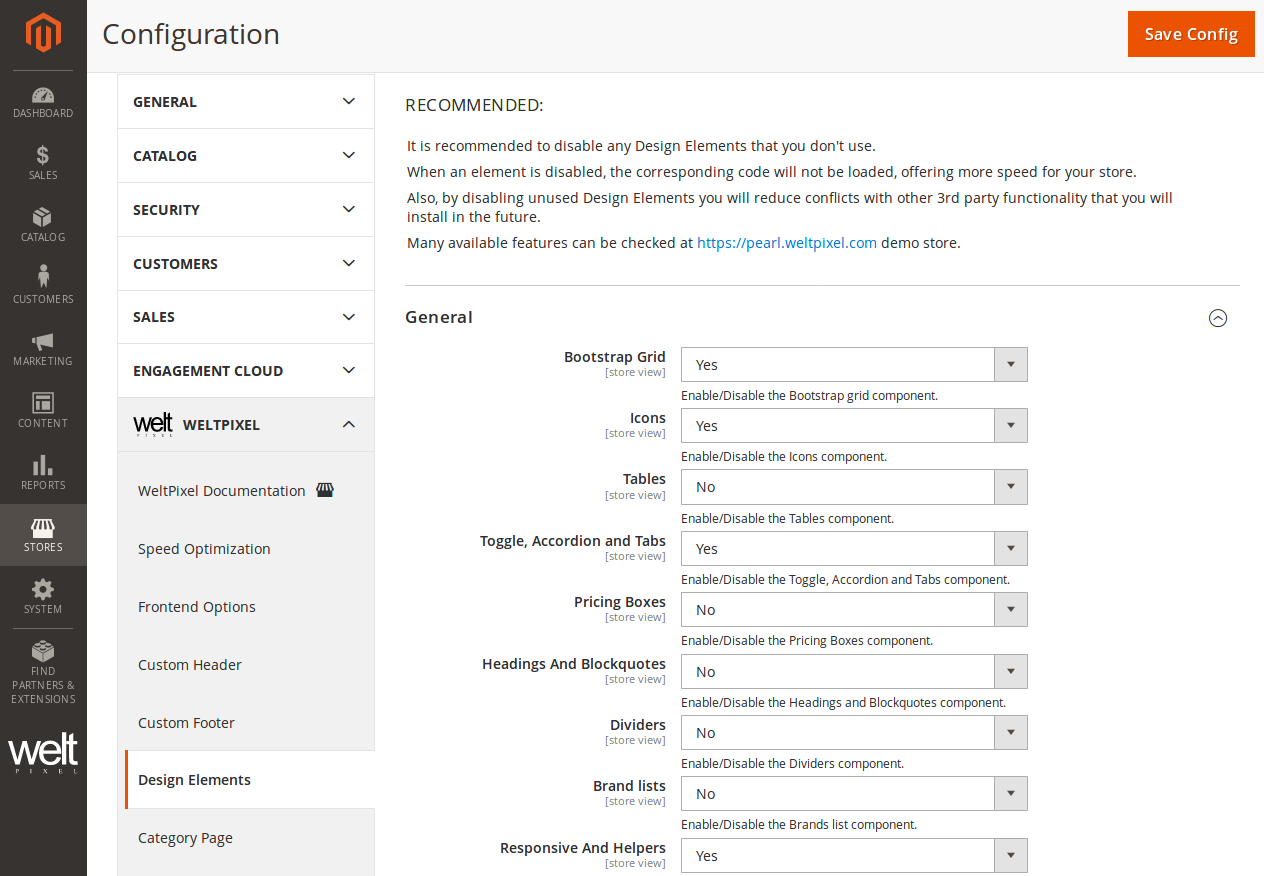
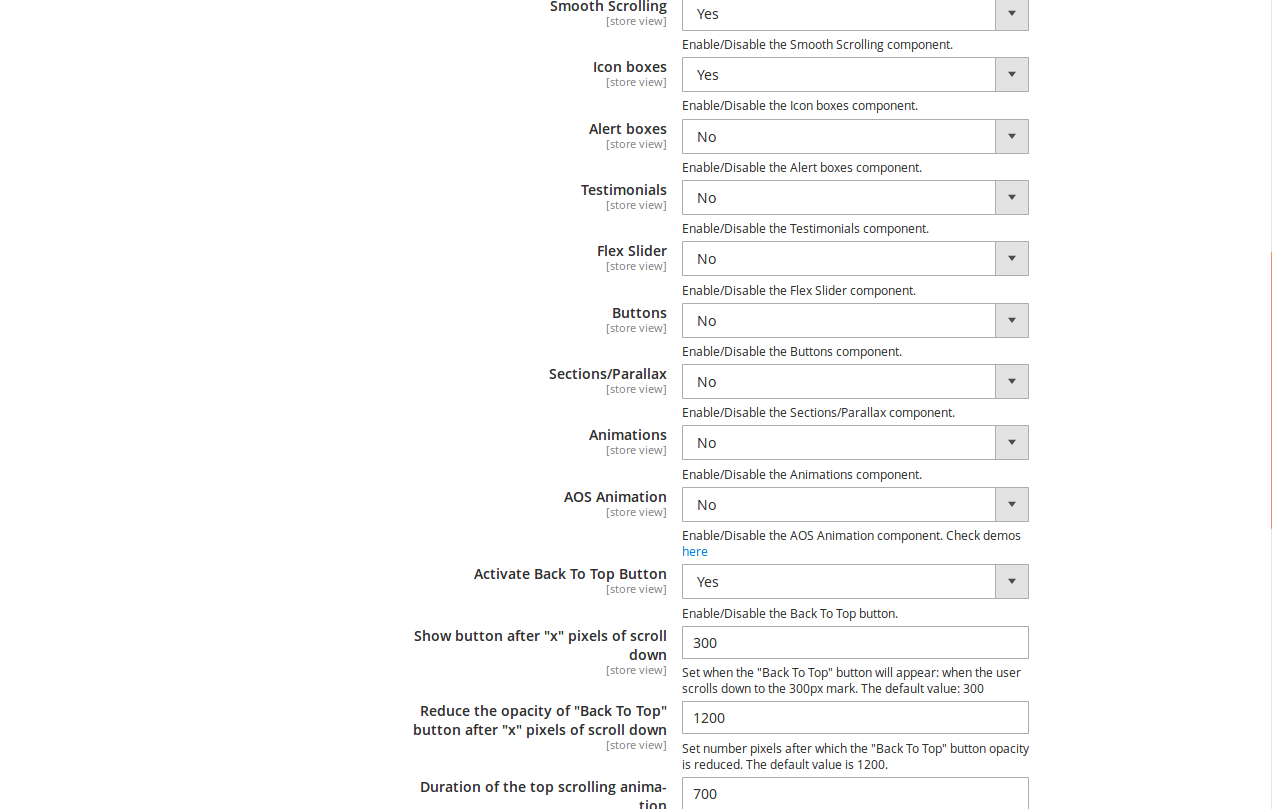
- Reduced the number of JS/CSS requests → store speed increased with every disabled element.
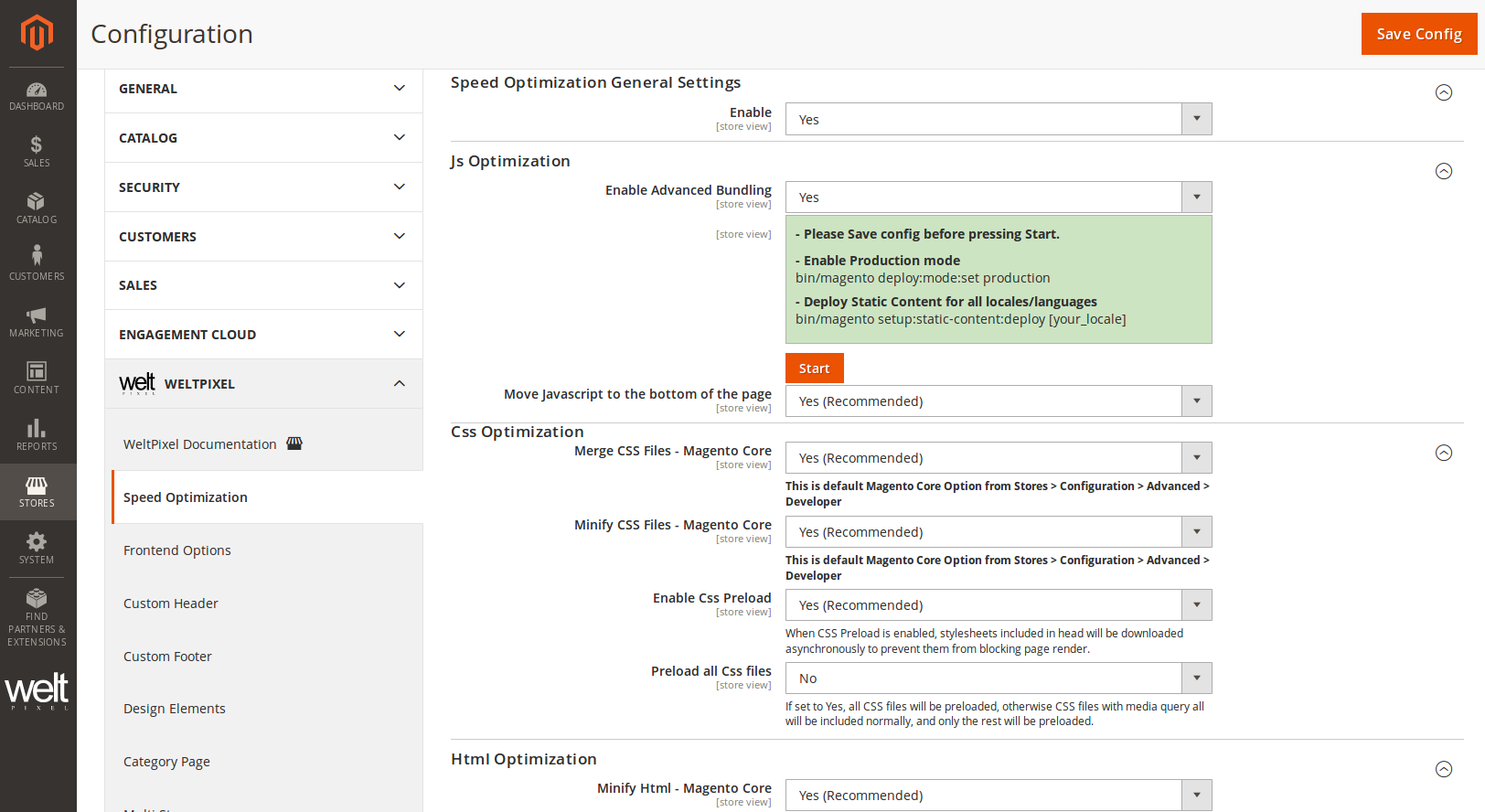
- Enabled all recommended options in the Speed Optimization module and implemented Advanced JS Bundling.
Conclusion
- Audit your project → disable unused Magento or Pearl Theme modules.
- Review enabled modules’ admin settings → find optimization options.
- Use the Speed Optimization module for advanced bundling and preloading.
This can significantly boost store speed and Google PageSpeed scores on both mobile and desktop.
See also:
- How to speed up your Magento 2 store and increase performance
- How to speed up your Magento 2 store with the Pearl Theme
Updated on: 17/09/2025
Thank you!